
Arbory is an iPhone-focused Plausible companion with traffic alerts, widgets and native iOS integrations. Tracksible advertises a one-site free tier that includes insights and goals, with a one-time Pro upgrade for more sites, all date ranges and widgets. Both offer a way to avoid a recurring app subscription.
Device availability comes before the feature checklist. Arbory has a public App Store listing requiring iOS 26 or later. Tracksible’s site says iOS is coming soon, and its linked Android listing could not be verified during this review. Confirm a working listing for your device before treating Tracksible as an immediate replacement.
These apps display an existing Plausible Analytics dashboard. They are not alternative analytics services, and purchasing a companion does not include a Plausible service plan.
Arbory and Tracksible at a glance
| What matters | Tracksible | Arbory |
|---|---|---|
| Device fit | Android destination needs confirmation; iOS coming soon | iPhone-focused; public listing requires iOS 26+ |
| Free websites | Advertises one | One |
| Free date ranges | Advertises Realtime, Today, Yesterday and Last 7 Days | Homepage lists Today and Last 7 Days |
| Home screen widgets | Pro | Pro |
| Goals and events | Goal conversions advertised in Free | Pro |
| More sites and dates | Pro: unlimited sites, every supported date range and widgets | Pro: unlimited sites and extended/custom dates |
| One-time price | Website advertises $9.99 USD | US App Store lists $12.99; website advertises $14.99 |
| Traffic alerts and daily summaries | Not verified | Advertised with Pro |
| Offline cached dashboard | Not verified | Advertised |
| Siri and Shortcuts | Not verified | Advertised; use a saved snapshot for traffic summaries |
| Cloud and self-hosted Plausible | Both advertised | Both advertised |
| Connection | Stats API key or share link advertised | API key required by listing |
Sources: Tracksible pricing, Arbory’s homepage and US App Store listing, checked on 12 September 2026. This table reports published information, not hands-on verification. “Not verified” is not a claim that a feature is missing.
Start with the phone you actually use
Arbory’s current US listing requires iOS 26 or later. Check that requirement before evaluating widgets or alerts: a good feature list does not help if the app cannot run on your phone.
Its store compatibility section also lists compatible Apple Silicon Macs and Apple Vision devices. That does not make it a purpose-built desktop or headset app. The product is positioned around the iPhone experience.
Tracksible’s website leads with Android, but the linked Google Play destination could not be confirmed during this review. Its iOS availability is explicitly marked as coming soon. If you are looking for an Arbory alternative on Android, confirm Tracksible’s public listing first. Do not infer Android availability from an iPhone-framed product image.
Applausible is another option with a public Android listing. Our three-app guide includes it; Tracksible should not be presented as the only Android companion.
Free dashboard features and Pro widgets
Arbory’s homepage offers one site, today’s statistics, the last seven days, a full dashboard and Face ID lock for free. It places widgets, goals and events, alerts, unlimited sites and full date ranges in Pro.
Tracksible includes insights and goal conversions in its free one-site tier. Its Pro upgrade adds unlimited sites, all supported date ranges and home screen widgets. A home screen snapshot requires Pro in both apps.
For someone responsible for catching a traffic drop, Arbory’s advertised alerts may matter more. Its App Store description includes spike/drop notifications and a daily summary at a chosen time. Those are different from opening an insights screen to see what has changed.
We have not verified equivalent alert behavior in Tracksible. The comparison therefore does not award it the same capability or mark alerts as definitely absent. Before paying for monitoring, check notification permissions, refresh behavior and delivery on the device you intend to use.
Pricing: why the storefront matters
Arbory’s homepage advertises $14.99 once. Its US App Store purchase section lists Arbory Pro at $12.99, while the app description mentions €14.99. These are not interchangeable prices.
Tracksible’s website advertises $9.99 USD once. Its actual store checkout price was not verified for this comparison. We therefore do not claim that every reader will save a fixed amount by choosing Tracksible.
The useful comparison is the price shown by your store for the features you need. Check whether you need Pro at all, whether the device meets the operating-system requirement, and whether any platform-specific purchase rules apply. Tracksible’s pricing page says a purchase does not automatically transfer between iOS and Android.
Both products describe Pro as a one-time purchase. “No subscription” is a shared characteristic, not a unique Tracksible advantage. Plausible service charges, where applicable, remain separate.
Arbory’s native iPhone features
Arbory’s listing advertises offline access to cached data, Face ID or Touch ID protection, and integration with Siri, Shortcuts, Spotlight and Control Center. These features make it relevant to readers who want to check or open a dashboard without navigating through the app each time.
There is an important detail in the release notes: Siri and Shortcuts use a limited snapshot saved on the device and do not fetch live Plausible data for those summaries. A saved summary and the dashboard’s current live visitor count answer different questions.
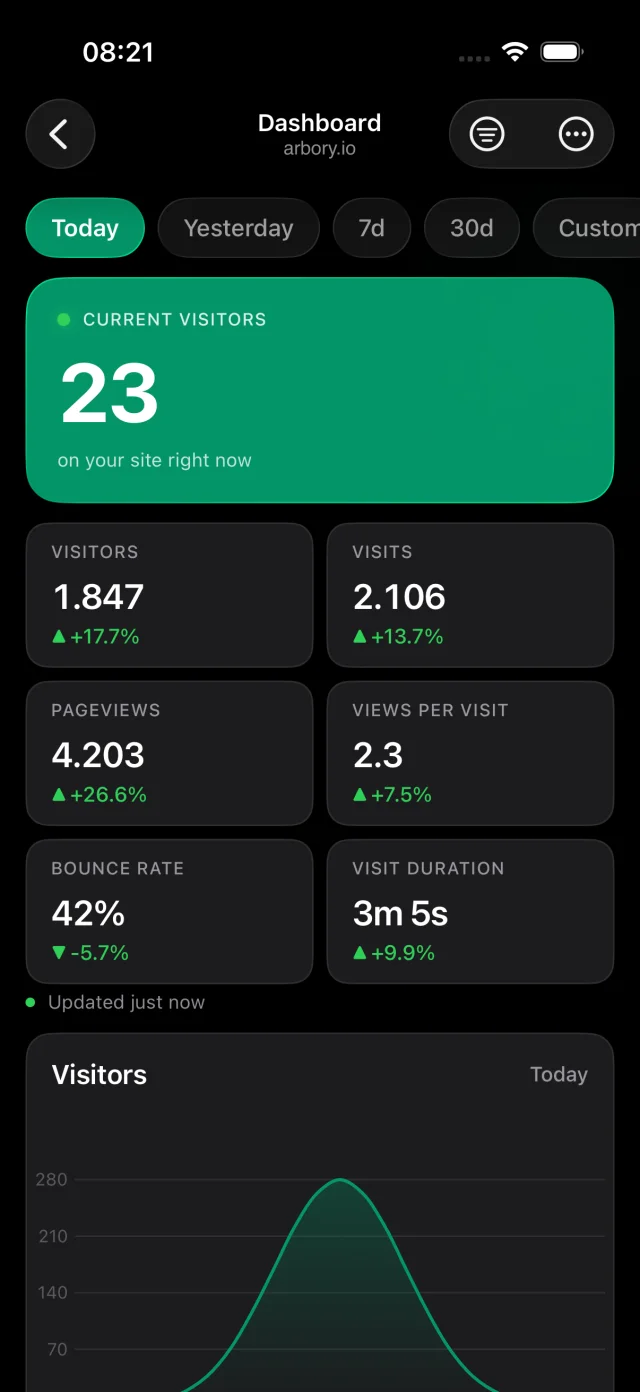
The listing also describes direct phone-to-Plausible connections and on-device notification processing. Those are the developer’s statements, not findings from a security audit conducted for this article. We do not rank either app as more secure on the basis of marketing copy alone.
Checking traffic inside Tracksible
Tracksible’s advertised views cover live visitors, traffic charts, pages and sources, audience breakdowns, goals and insights. Its supplied product preview shows an overview with a date selector, a visitor chart and metric cards.
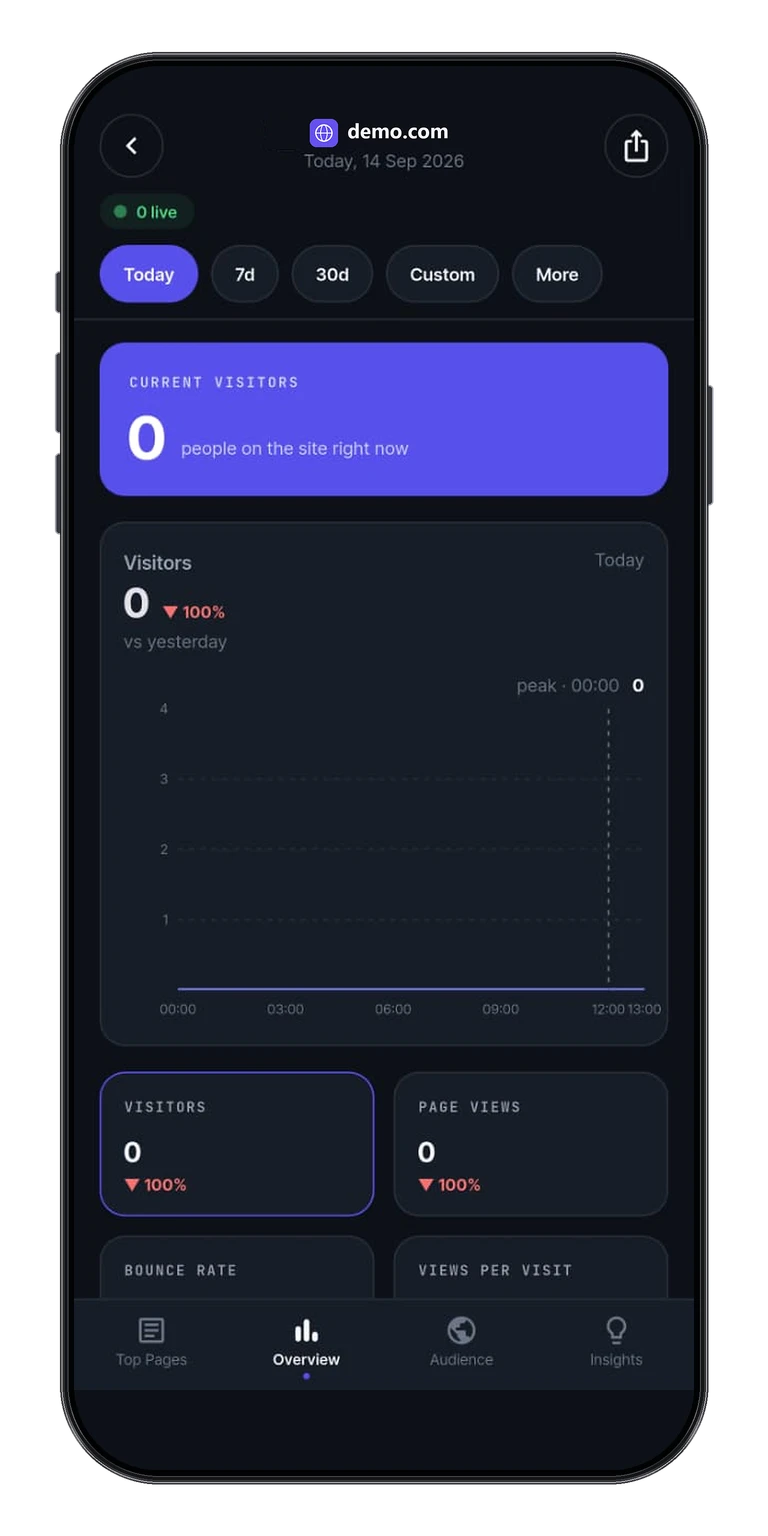
For a fair comparison, use the same Plausible site, date range and timezone. Check a source or goal you recognize, rather than judging the apps only by their headline visitor number. Widgets may refresh later than an open dashboard because the operating system controls background updates.
The right app depends on what happens next: do you open it for a daily check, keep a widget visible, or expect a notification when traffic changes? Those are separate workflows, and this source-based comparison does not establish which app performs them more reliably.
Cloud, self-hosted and connection choices
Both products advertise support for Plausible Cloud and self-hosted installations. Arbory’s listing requires an API key and mentions custom URLs, reverse proxies and non-standard ports. Tracksible advertises both a Stats API key and a share-link connection.
A share link can be relevant when a client or teammate gives you dashboard access without their account credentials. Check the Tracksible setup instructions and the data supported by your server version and connection. We have not verified a share-link-only workflow in Arbory and do not label it unsupported.
Changing a companion app is not an analytics-provider migration. Connect to the existing dashboard; do not replace the site’s analytics script merely because you chose a new mobile viewer. Saved settings, paid entitlements and notification preferences should be checked separately. No automatic transfer between the apps is established here.
Which should you choose?
Consider Arbory if you have a compatible iPhone and want its advertised traffic alerts, daily summaries, cached dashboard or iOS integrations. Those are concrete reasons to look beyond the headline Pro price.
Consider Tracksible if the advertised one-site free tier covers your daily checks, insights and goals, or a share-link connection fits how you receive dashboard access. Confirm the released app and a working store destination before choosing it.
For a single-site reader, the first question is what you need free. For an operator watching multiple sites, it is which paid workflow matters: broader date ranges, site switching, alerts, or quick access from the phone’s system controls.
Read Tracksible’s features, free and Pro terms and current availability. If you also want iPad or Android options, continue to Applausible vs Tracksible.
Sources and review method
Webjuice makes Tracksible. This article uses published product pages and store information; it is not an independent benchmark or hands-on review. Unknown capabilities remain unknown, and price differences are attributed to their sources rather than turned into universal savings claims.
- Tracksible pricing
- Tracksible setup guidance
- Arbory website: free and Pro features
- Arbory US App Store listing: purchases, compatibility and release notes
Product information reviewed on 12 September 2026. Confirm your current store offer before purchasing.
Tracksible tier details were checked against its mobile app source on 14 September 2026. Home screen widgets require Pro. Competitor source dates above are unchanged.